
465 字
1 分钟
Halo博客Hao主题添加个人导航页
本教程是修改的主题是Halo-theme-Hao 版本是:1.6.6
根据友联页面修改而来。
原理是添加链接,给分组添加一个自定义属性,通过属性过滤展示的链接
效果如图:前往:导航页
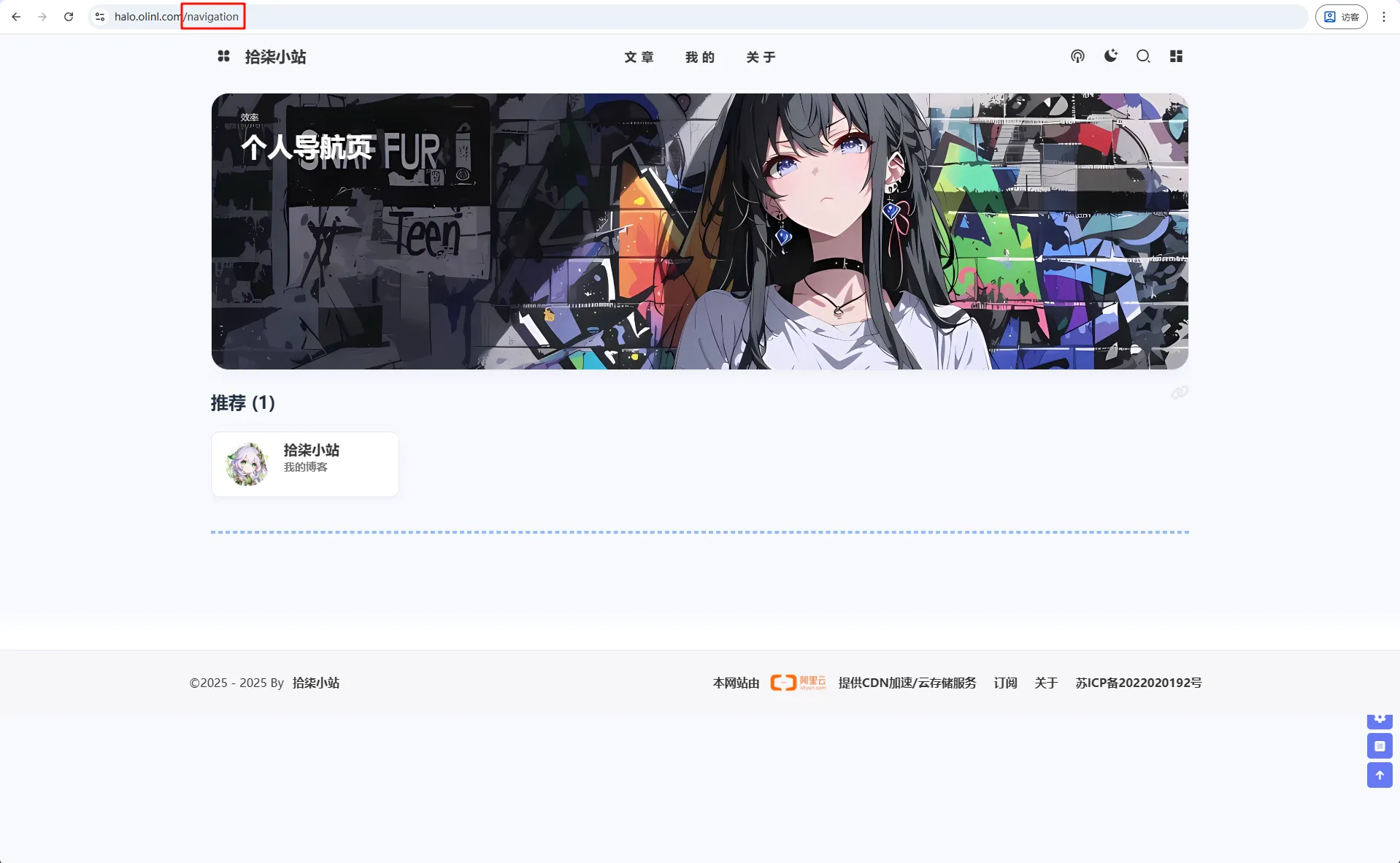
下面就开始教程吧!
修改Halo运行配置
在运行时会缓存模板文件,下次访问不再会读取物理的模板文件,这会有性能的损耗。
如果我们修改主题,可以添加一个运行参数
# 关闭主题模板缓存- --spring.thymeleaf.cache=false创建navigation模板页面
首先先找到主题文件夹:在持久化存储的halo2文件夹下的themes/theme-hao里面
修改theme.yaml配置
找到spec.customTemplates.page添加一个导航页面模板:
spec: displayName: Hao author: name: 程序员小航 & 困困鱼 & Carol website: https://github.com/chengzhongxue customTemplates: page: - name: 友情链接页面模版 description: 支持可预设文本的友链 screenshot: file: page_links.html # 添加导航页面模板 - name: 导航页面模板 description: 个人导航页 screenshot: file: navigation.html添加navigation.html
在templates目录下新建一个文件navigation.html
添加如下内容:
<!DOCTYPE html><html xmlns:th="http://www.thymeleaf.org" th:replace="~{modules/layouts/layout :: layout(content = ~{::content}, htmlType = 'page',title = ${singlePage.spec.title + ' | ' + site.title}, head = ~{::head})}"><th:block th:fragment="head"> <th:block th:replace="~{modules/common/open-graph :: open-graph(_title = ${singlePage.spec.title}, _permalink = ${singlePage.status.permalink}, _cover = ${singlePage.spec.cover}, _excerpt = ${singlePage.status.excerpt}, _type = 'website')}"></th:block></th:block><th:block th:fragment="content">
<div class="page" id="body-wrap"> <header class="not-top-img" id="page-header"> <nav th:replace="~{modules/nav :: nav(title = ${singlePage.spec.title})}"></nav> <link rel="stylesheet" type="text/css" th:href="${assets_link + '/libs/fcircle/heo-fcircle3.css'}">
</header> <main class="layout hide-aside" id="content-inner"> <div id="page"> <th:block th:replace="~{macro/content-nav :: content-nav(${htmlType})}" /> <hr/> <!--/* 评论组件 */--> <th:block th:replace="~{modules/comment :: comment(group = 'content.halo.run', kind = 'SinglePage', name = ${singlePage.metadata.name}, allowComment = ${singlePage.spec.allowComment})}"/> </div> </main> <!-- 底部 --> <footer th:replace="~{modules/footer}"/> </div>
</th:block>
</html>如果想要知道如何修改的,看下面:
将友联对应的html文件复制过来,修改th:block th:replace标签里面的content-links 改为content-nav
<th:block th:replace="~{macro/content-links :: content-links(${htmlType})}" />改为 <th:block th:replace="~{macro/content-nav :: content-nav(${htmlType})}" />创建conten-nav.html
在主题的templates/macro文件夹的下创建conten-nav.html文件
<th:block th:fragment="content-nav(htmlType)">
<th:block th:with="groups = ${linkFinder.groupBy()}"> <div th:replace="~{macro/author-content :: author-content(background = ${theme.config.moment.backgroundImg}, smallTitle = '效率', bigTitle = '个人导航页', detail = '', buttonUrl = '', buttonTitle = '')}"></div>
<!--互动友链-->
<div class="flink" id="article-container">
<th:block th:each="group,iterStat : ${groups}"> <!-- 只显示 LinkOrFriend 注解等于 "Link" 的分组 --> <th:block th:if="${!group.metadata.annotations.containsKey('LinkOrFriend') or #strings.isEmpty(group.metadata.annotations['LinkOrFriend']) or #strings.equals(group.metadata.annotations['LinkOrFriend'], 'Link')}"> <h2 th:if="${not #lists.isEmpty(group.spec.displayName)}"> <a class="headerlink" th:href="'#'+${group.spec.displayName}+'-'+${group.links.size}" th:title="${group.spec.displayName}+ '('+${group.links.size}+')'"></a> [[${group.spec.displayName}]] ([[${group.links.size}]]) </h2>
<div class="flink-desc" th:if="${not #strings.isEmpty(#annotations.get(group, 'description'))}">[[${#annotations.get(group, 'description')}]]</div>
<!-- 第一个,使用卡片展示 --> <div th:if="${#strings.equals(#annotations.get(group, 'displayStyle'),'beautify') && not #lists.isEmpty(group.links)}" class="site-card-group">
<div class="site-card" th:each="link : ${group.links}"> <span th:if="${not #strings.isEmpty(#annotations.get(link, 'label'))}" th:style="'background-color:' + ${#annotations.get(link,'labelColor')}" class="site-card-tag">[[${#annotations.get(link, 'label')}]]</span>
<a class="img" target="_blank" th:href="${link.spec.url}" th:title="${link.spec.displayName}"> <img class="flink-avatar" style="pointer-events: none;" th:alt="${link.spec.displayName}" th:with="img = @{${#strings.isEmpty(#annotations.get(link, 'siteshot')) ? link.spec.logo : #annotations.get(link,'siteshot') }}"
th:src="${isLazyload ? loadingImg : img}" th:data-lazy-src="${ isLazyload ? img : ''}"> </a>
<a class="info cf-friends-link" target="_blank" th:href="${link.spec.url}" th:title="${link.spec.displayName}"> <div class="site-card-avatar no-lightbox"> <img class="flink-avatar cf-friends-avatar" th:alt="${link.spec.displayName}"
th:src="${isLazyload ? loadingImg : link.spec.logo}" th:data-lazy-src="${ isLazyload ? link.spec.logo : ''}"> </div> <div class="site-card-text"> <span class="title cf-friends-name" th:text="${link.spec.displayName}"></span> <span class="desc" th:text="${link.spec.description}" th:title="${link.spec.description}"></span> </div> </a> </div>
</div>
<div class="flink-list" th:if="${#strings.equals(#annotations.get(group, 'displayStyle'),'default') && not #lists.isEmpty(group.links)}"> <div class="flink-list-item" th:each="link : ${group.links}"> <span th:if="${not #strings.isEmpty(#annotations.get(link, 'label'))}" th:style="'background-color:' + ${#annotations.get(link,'labelColor')}" class="site-card-tag">[[${#annotations.get(link, 'label')}]]</span> <a class="cf-friends-link" rel="external nofollow" target="_blank" th:href="${link.spec.url}" th:title="${link.spec.displayName}"> <img class="flink-avatar cf-friends-avatar" th:alt="${link.spec.displayName}"
th:src="${isLazyload ? loadingImg : link.spec.logo}" th:data-lazy-src="${ isLazyload ? link.spec.logo : ''}"> <div class="flink-item-info no-lightbox"> <span class="flink-item-name cf-friends-name" th:text="${link.spec.displayName}"></span> <span class="flink-item-desc" th:text="${link.spec.description}" th:title="${link.spec.description}"></span> <img th:src="${isLazyload ? loadingImg : link.spec.logo}" th:data-lazy-src="${ isLazyload ? link.spec.logo : ''}"> </div> </a> </div> </div>
<div class="flink-list mini" th:if="${#strings.equals(#annotations.get(group, 'displayStyle'),'deprecated') && not #lists.isEmpty(group.links)}"> <div class="flink-list-item" th:each="link : ${group.links}"> <a class="cf-friends-link" rel="external nofollow" target="_blank" th:href="${link.spec.url}" th:title="${link.spec.displayName}"> <img class="flink-avatar cf-friends-avatar"
th:src="${isLazyload ? loadingImg : link.spec.logo}" th:data-lazy-src="${ isLazyload ? link.spec.logo : ''}" th:alt="${link.spec.displayName}"> <div class="img-alt is-center">[[${link.spec.displayName}]]</div> <div class="flink-item-info"> <span class="flink-item-name cf-friends-name">[[${link.spec.displayName}]]</span> <span class="flink-item-desc" th:title="${link.spec.description}">[[${link.spec.description}]]</span> </div> </a> </div> </div> </th:block> </th:block>
<th:block th:if="${not #strings.isEmpty(theme.config.link.linksArticle)}" th:utext="${theme.config.link.linksArticle}"> </th:block>
<script> var fdataUser = { jsonurl: '', apiurl: "[(${theme.config.fcircle.apiurl})]", apipublicurl: '', //默认公共库 initnumber: 20, //首次加载文章数 stepnumber: 20, //更多加载文章数 article_sort: 'created', //文章排序 updated or created error_img: 'https://sdn.geekzu.org/avatar/57d8260dfb55501c37dde588e7c3852c' } </script> <script th:src="@{/assets/libs/fcircle/heo-fcircle3mini.js}"></script>
<th:block th:if="${htmlType == 'page'}" th:utext="${singlePage.content.content}"> </th:block>
</div>
</th:block></th:block>该组件是从友联页面拷贝而来,上面图片使用的是moments.html里面的。如需修改请自行修改
其中:
<th:block th:if="${!group.metadata.annotations.containsKey('LinkOrFriend') or #strings.isEmpty(group.metadata.annotations['LinkOrFriend']) or #strings.equals(group.metadata.annotations['LinkOrFriend'], 'Link')}">
<!-- 是只显示 LinkOrFriend 注解等于 "Link" 的分组 -->修改links
要让友联页面只显示友联的链接。
修改content-links.html
这个页面为展示的链接
找到macro\content-links.html,大概28行有一个<th:block th:each="group : ${groups}">修改为以下:
<th:block th:each="group : ${groups}" th:if="${group.metadata != null and group.metadata.annotations != null and #strings.equals(group.metadata.annotations['LinkOrFriend'], 'Friend')}">修改links-canvas.html
这个页面为展示的互动canvas
到最底下修改JavaScript脚本:
<script th:inline="javascript"> function refreshFrame() { document.getElementById('iframe').contentWindow.location.reload(true); } const group = [[${ groups }]]
// 只保留:LinkOrFrend 有值 且 等于 'Frend' const filteredGroups = groups.filter(group => { const value = group?.metadata?.annotations?.['LinkOrFriend']; return value !== undefined && value !== null && value === 'Friend'; });
const logos = filteredGroups .flatMap(group => group.links || []) .map(link => link.spec?.logo) .filter(logo => logo && typeof logo === 'string' && logo.trim() !== '');
localStorage.setItem('logos', JSON.stringify(logos)) </script>创建页面
在后台创建一个页面,自定义模板选择我们刚才创建的导航页面模板,进行发布。
创建链接
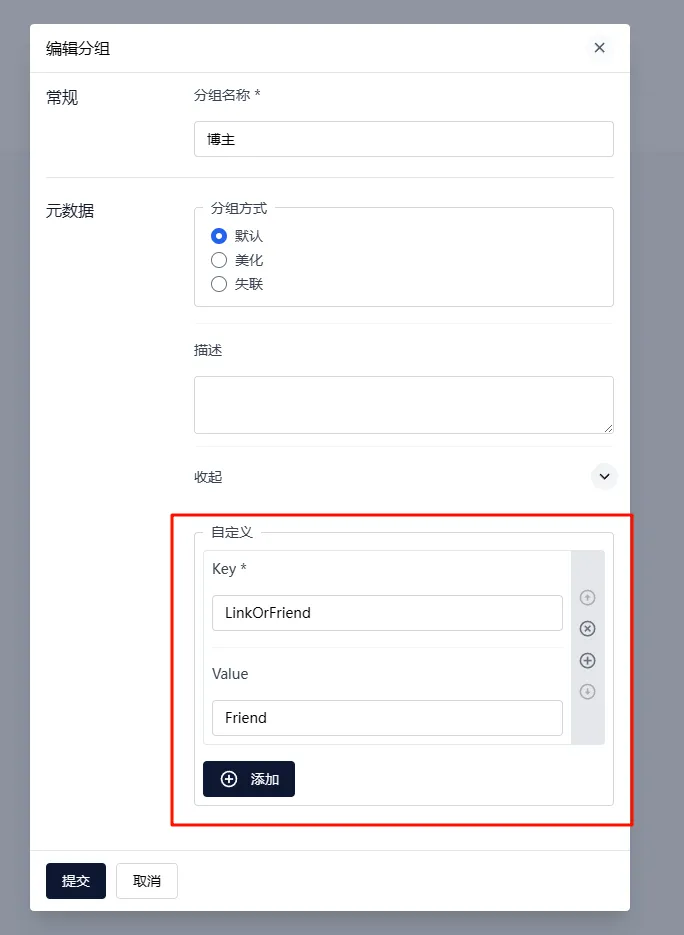
随后在后台的链接里面添加分组自定义一个参数LinkOrFriend=Friend就在友联里面显示,LinkOrFriend=Link或者不填写,就在导航页里面显示
分享
如果这篇文章对你有帮助,欢迎分享给更多人!
Halo博客Hao主题添加个人导航页
https://blog.olinl.com/posts/halo-hao-navigation/ 相关文章 智能推荐
1
为了护住我那几块硬盘:我的 UPS 监控“三部曲
HomeLab 私有云 从 PVE 备注里的简陋脚本,到独立的 Node.js Web 监控页,记录一个 HomeLab 玩家的 UPS 监控进阶之路。
2
NAS 碎文件存储优化:VHDX 虚拟磁盘方案
HomeLab 私有云 针对 NAS 存储海量碎文件导致的卡顿与 SMB 传输缓慢问题,通过 VHDX 虚拟磁盘镜像实现“化零为整”的存储优化方案。
3
Proxmox VE 9.0 安装与初始配置指南
HomeLab 私有云 从下载安装到换源、内核更新、SR-IOV 核显虚拟化、订阅弹窗去除、存储合并的 PVE 9.0 完整配置流程。
4
PVE Intel 核显独占直通教程
HomeLab 私有云 在 Proxmox VE 上为虚拟机配置 Intel 核显 PCIe 独占直通,包含 IOMMU 启用、内核模块加载、VFIO 绑定及虚拟机配置的完整流程。
5
PVE Intel 核显 GVT-g 虚拟化教程
HomeLab 私有云 在 Proxmox VE 上为 Intel 5-10 代 CPU 开启 GVT-g 核显虚拟化,实现多个虚拟机共享宿主机集成显卡,适合需要图形加速但不独占 GPU 的场景。
